
How to sign up for ReviewForest
Follow these steps to set up your ReviewForest account and plant your forest!
-
Start the sign-up process
- Go to https://app.reviewforest.org/signup
- You’ll land on the ReviewForest sign-up page

We’re curious to hear about your goals!

-
Connect your business
- Pick a platform and follow the relevant instructions to connect your platform listing
- If you have several locations, you can add them one after another

-
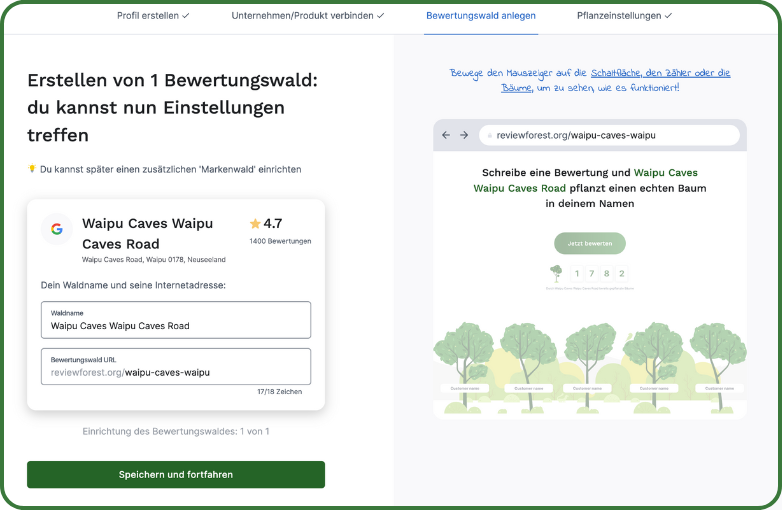
Create your review forest
- Your forest is created with a unique URL (e.g. reviewforest.org/your-business-name)
- You can adjust the forest name if needed
-
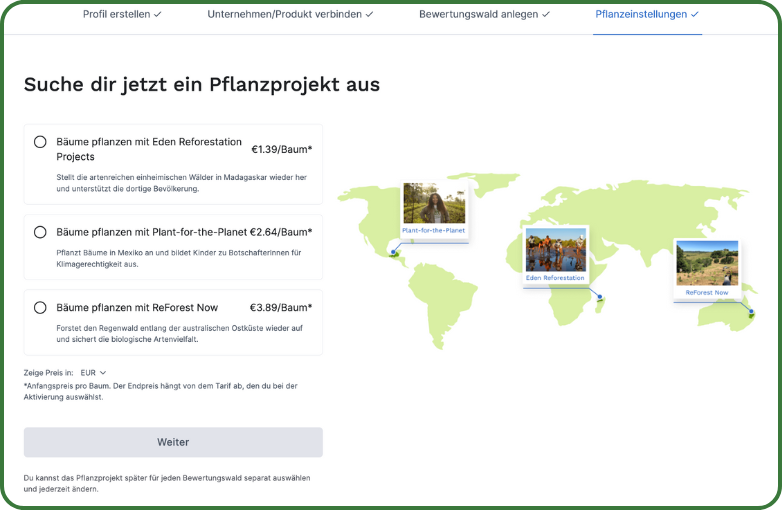
Choose your planting project
- Each project has a different price per tree and a different focus
-
Set a planting limit if you like
- Decide whether you want to set a planting limit
- If you do, choose between the preset options (50, 100, 500 trees) or enter a custom number
- The minimum planting limit is 50 trees

-
Complete the setup and start growing
- Click “Start growing” to finish your setup
What awaits you in your members area
Section titled “What awaits you in your members area”Once you’ve completed sign-up, you’ll have the chance to take a leisurely look around.
Overview: Get a quick snapshot of your planted trees and the reviews you’ve received
Review forests: Manage your individual review forests, configure planting settings, upload your logo, and much more…
Marketing tools:
- Website widgets: Show off the growth of your forest on your website
- Email & SMS: Set up communication with your customers
- Print templates: Access designs for physical marketing materials
- Digital templates: Get templates for social media and online use
Account management: Update your subscription, payment information, and other settings
Integrations: Get access to our public API or manage your Google connection
Take your time and explore all of ReviewForest’s features! When you’re ready, here’s the guide to activating your subscription.