
So änderst du den Google Bewertungslink
Wann brauchst du das?
Abschnitt betitelt „Wann brauchst du das?“In den allermeisten Fällen funktioniert der automatische Bewertungslink ohne Anpassung. Du brauchst diese Anleitung nur, wenn einer der folgenden Fälle auf dich zutrifft:
- Verschachtelter Standort: Dein Unternehmen sitzt in einem fremden Gebäude oder im Rahmen einer anderen Einrichtung (zum Beispiel eine Schule innerhalb einer Akademie, eine Praxis innerhalb eines Ärztehauses, ein Stand auf einem Campus). In diesen Fällen erkennt Google den Standort manchmal nicht eigenständig, und auf den Standardlink öffnet sich keine Bewertungsmaske.
- Klick auf “Jetzt bewerten” funktioniert nicht: Wenn du oder Testkunden den Bewertungs-Button auf deinem Bewertungswald drücken und nichts passiert, ist das ein typischer Hinweis auf genau dieses Problem.
- Du möchtest aus anderen Gründen einen eigenen Bewertungslink hinterlegen.
Welches Link-Format wird akzeptiert?
Abschnitt betitelt „Welches Link-Format wird akzeptiert?“ReviewForest akzeptiert ausschließlich den von Google selbst generierten Kurzlink im Format:
https://g.page/r/DEINE-BUSINESS-ID/reviewAndere Links (zum Beispiel eine Google-Suche-URL oder eine Google-Maps-URL) werden beim Speichern abgelehnt. Den g.page-Kurzlink bekommst du nur, wenn du als Admin auf das Google Unternehmensprofil zugreifen kannst.
Anleitung
Abschnitt betitelt „Anleitung“-
Anmelden: Melde dich in deinem ReviewForest Konto an und navigiere zu Bewertungswälder.
-
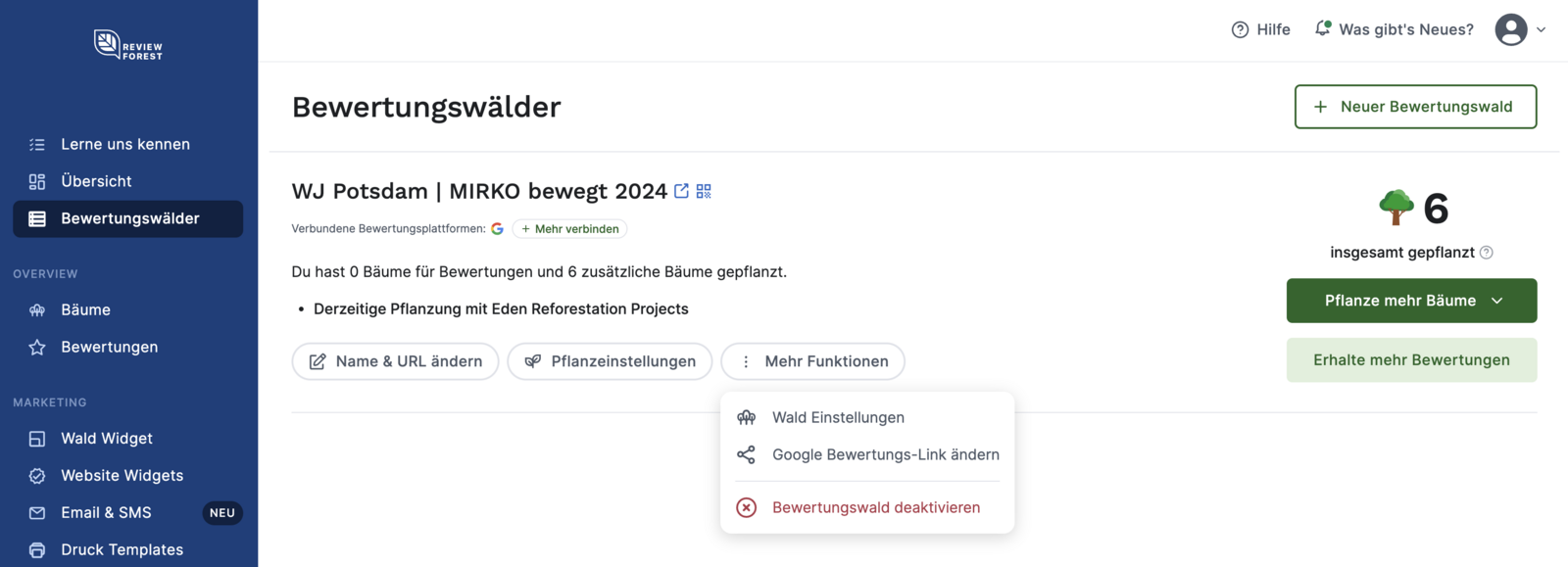
Bewertungswald anpassen: Wähle den entsprechenden Bewertungswald, klicke auf “Mehr Funktionen” > “Google Bewertungs-Link ändern”.
-
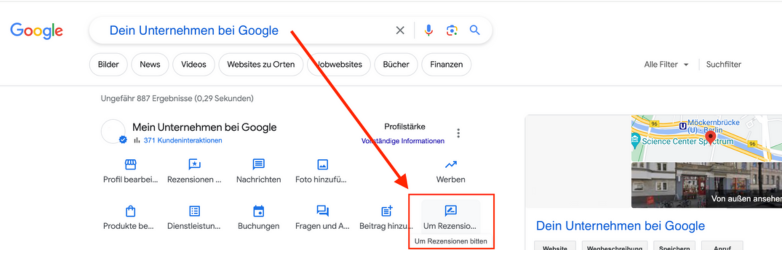
Google Rezensionslink bei Google holen:
- Öffne Google in einem neuen Browser-Fenster
- Suche nach deinem Unternehmen
- Stelle sicher, dass du als Admin deines Google Unternehmensprofils angemeldet bist
- Klicke auf “Um Rezensionen bitten”
- Google zeigt dir einen Kurzlink im Format
https://g.page/r/.../reviewan
-
Link kopieren: Kopiere den angezeigten Rezensionslink. Wichtig: Es muss der
g.page/r/.../reviewLink sein, kein anderer.
-
Link einfügen und speichern:
- Kehre zu deinem ReviewForest Konto zurück
- Füge den Google Rezensionslink in die Eingabemaske ein
- Bestätige die Änderung

Was tun, wenn ich keinen Admin-Zugriff auf das Unternehmensprofil habe?
Abschnitt betitelt „Was tun, wenn ich keinen Admin-Zugriff auf das Unternehmensprofil habe?“Den g.page-Kurzlink generiert Google nur für Admins des jeweiligen Google Unternehmensprofils. Wenn dein Standort beispielsweise unter einem fremden Träger geführt wird (Akademie, Universität, gemeinsam genutzter Coworking-Space), brauchst du entweder:
- Co-Verwaltung beim Träger anfragen: Der Träger kann dich als zusätzlichen Inhaber im Unternehmensprofil hinzufügen. Dann hast du selbst Admin-Zugriff und kannst den Link generieren.
- Den Link über den Träger erfragen: Falls Co-Verwaltung nicht möglich ist, frag beim Inhaber, ob er dir den
g.page/r/.../review-Link aus seinem Unternehmensprofil schickt.
Unterstützung
Abschnitt betitelt „Unterstützung“Wenn du Fragen hast oder Hilfe benötigst, zögere nicht, unseren Support zu kontaktieren. Wir stehen dir gerne zur Verfügung!